
Groups
Groups
Section titled “Groups”CoderClaw treats group chats consistently across surfaces: WhatsApp, Telegram, Discord, Slack, Signal, iMessage, Microsoft Teams.
Beginner intro (2 minutes)
Section titled “Beginner intro (2 minutes)”CoderClaw “lives” on your own messaging accounts. There is no separate WhatsApp bot user. If you are in a group, CoderClaw can see that group and respond there.
Default behavior:
- Groups are restricted (
groupPolicy: "allowlist"). - Replies require a mention unless you explicitly disable mention gating.
Translation: allowlisted senders can trigger CoderClaw by mentioning it.
TL;DR
- DM access is controlled by
*.allowFrom.- Group access is controlled by
*.groupPolicy+ allowlists (*.groups,*.groupAllowFrom).- Reply triggering is controlled by mention gating (
requireMention,/activation).
Quick flow (what happens to a group message):
groupPolicy? disabled -> dropgroupPolicy? allowlist -> group allowed? no -> droprequireMention? yes -> mentioned? no -> store for context onlyotherwise -> reply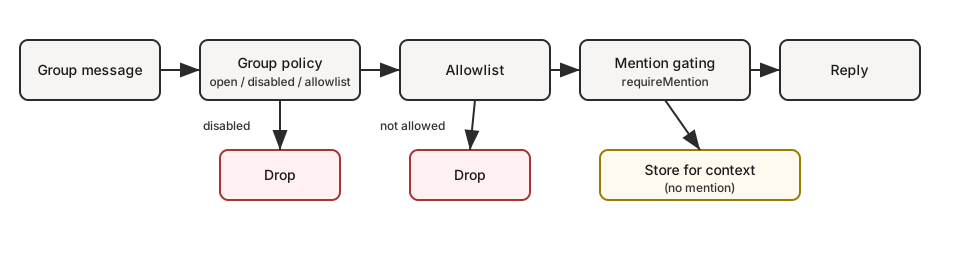
If you want…
| Goal | What to set |
|---|---|
| Allow all groups but only reply on @mentions | groups: { "*": { requireMention: true } } |
| Disable all group replies | groupPolicy: "disabled" |
| Only specific groups | groups: { "<group-id>": { ... } } (no "*" key) |
| Only you can trigger in groups | groupPolicy: "allowlist", groupAllowFrom: ["+1555..."] |
Session keys
Section titled “Session keys”- Group sessions use
agent:<agentId>:<channel>:group:<id>session keys (rooms/channels useagent:<agentId>:<channel>:channel:<id>). - Telegram forum topics add
:topic:<threadId>to the group id so each topic has its own session. - Direct chats use the main session (or per-sender if configured).
- Heartbeats are skipped for group sessions.
Pattern: personal DMs + public groups (single agent)
Section titled “Pattern: personal DMs + public groups (single agent)”Yes — this works well if your “personal” traffic is DMs and your “public” traffic is groups.
Why: in single-agent mode, DMs typically land in the main session key (agent:main:main), while groups always use non-main session keys (agent:main:<channel>:group:<id>). If you enable sandboxing with mode: "non-main", those group sessions run in Docker while your main DM session stays on-host.
This gives you one agent “brain” (shared workspace + memory), but two execution postures:
- DMs: full tools (host)
- Groups: sandbox + restricted tools (Docker)
If you need truly separate workspaces/personas (“personal” and “public” must never mix), use a second agent + bindings. See Multi-Agent Routing.
Example (DMs on host, groups sandboxed + messaging-only tools):
{ agents: { defaults: { sandbox: { mode: "non-main", // groups/channels are non-main -> sandboxed scope: "session", // strongest isolation (one container per group/channel) workspaceAccess: "none", }, }, }, tools: { sandbox: { tools: { // If allow is non-empty, everything else is blocked (deny still wins). allow: ["group:messaging", "group:sessions"], deny: ["group:runtime", "group:fs", "group:ui", "nodes", "cron", "gateway"], }, }, },}Want “groups can only see folder X” instead of “no host access”? Keep workspaceAccess: "none" and mount only allowlisted paths into the sandbox:
{ agents: { defaults: { sandbox: { mode: "non-main", scope: "session", workspaceAccess: "none", docker: { binds: [ // hostPath:containerPath:mode "/home/user/FriendsShared:/data:ro", ], }, }, }, },}Related:
- Configuration keys and defaults: Gateway configuration
- Debugging why a tool is blocked: Sandbox vs Tool Policy vs Elevated
- Bind mounts details: Sandboxing
Display labels
Section titled “Display labels”- UI labels use
displayNamewhen available, formatted as<channel>:<token>. #roomis reserved for rooms/channels; group chats useg-<slug>(lowercase, spaces ->-, keep#@+._-).
Group policy
Section titled “Group policy”Control how group/room messages are handled per channel:
{ channels: { whatsapp: { groupPolicy: "disabled", // "open" | "disabled" | "allowlist" groupAllowFrom: ["+15551234567"], }, telegram: { groupPolicy: "disabled", groupAllowFrom: ["123456789"], // numeric Telegram user id (wizard can resolve @username) }, signal: { groupPolicy: "disabled", groupAllowFrom: ["+15551234567"], }, imessage: { groupPolicy: "disabled", groupAllowFrom: ["chat_id:123"], }, msteams: { groupPolicy: "disabled", }, discord: { groupPolicy: "allowlist", guilds: { GUILD_ID: { channels: { help: { allow: true } } }, }, }, slack: { groupPolicy: "allowlist", channels: { "#general": { allow: true } }, }, matrix: { groupPolicy: "allowlist", groupAllowFrom: ["@owner:example.org"], groups: { "!roomId:example.org": { allow: true }, "#alias:example.org": { allow: true }, }, }, },}| Policy | Behavior |
|---|---|
"open" | Groups bypass allowlists; mention-gating still applies. |
"disabled" | Block all group messages entirely. |
"allowlist" | Only allow groups/rooms that match the configured allowlist. |
Notes:
groupPolicyis separate from mention-gating (which requires @mentions).- WhatsApp/Telegram/Signal/iMessage/Microsoft Teams: use
groupAllowFrom(fallback: explicitallowFrom). - Discord: allowlist uses
channels.discord.guilds.<id>.channels. - Slack: allowlist uses
channels.slack.channels. - Matrix: allowlist uses
channels.matrix.groups(room IDs, aliases, or names). Usechannels.matrix.groupAllowFromto restrict senders; per-roomusersallowlists are also supported. - Group DMs are controlled separately (
channels.discord.dm.*,channels.slack.dm.*). - Telegram allowlist can match user IDs (
"123456789","telegram:123456789","tg:123456789") or usernames ("@alice"or"alice"); prefixes are case-insensitive. - Default is
groupPolicy: "allowlist"; if your group allowlist is empty, group messages are blocked.
Quick mental model (evaluation order for group messages):
groupPolicy(open/disabled/allowlist)- group allowlists (
*.groups,*.groupAllowFrom, channel-specific allowlist) - mention gating (
requireMention,/activation)
Mention gating (default)
Section titled “Mention gating (default)”Group messages require a mention unless overridden per group. Defaults live per subsystem under *.groups."*".
Replying to a bot message counts as an implicit mention (when the channel supports reply metadata). This applies to Telegram, WhatsApp, Slack, Discord, and Microsoft Teams.
{ channels: { whatsapp: { groups: { "*": { requireMention: true }, }, }, telegram: { groups: { "*": { requireMention: true }, "123456789": { requireMention: false }, }, }, imessage: { groups: { "*": { requireMention: true }, "123": { requireMention: false }, }, }, }, agents: { list: [ { id: "main", groupChat: { mentionPatterns: ["@coderclaw", "coderclaw", "\\+15555550123"], historyLimit: 50, }, }, ], },}Notes:
mentionPatternsare case-insensitive regexes.- Surfaces that provide explicit mentions still pass; patterns are a fallback.
- Per-agent override:
agents.list[].groupChat.mentionPatterns(useful when multiple agents share a group). - Mention gating is only enforced when mention detection is possible (native mentions or
mentionPatternsare configured). - Discord defaults live in
channels.discord.guilds."*"(overridable per guild/channel). - Group history context is wrapped uniformly across channels and is pending-only (messages skipped due to mention gating); use
messages.groupChat.historyLimitfor the global default andchannels.<channel>.historyLimit(orchannels.<channel>.accounts.*.historyLimit) for overrides. Set0to disable.
Group/channel tool restrictions (optional)
Section titled “Group/channel tool restrictions (optional)”Some channel configs support restricting which tools are available inside a specific group/room/channel.
tools: allow/deny tools for the whole group.toolsBySender: per-sender overrides within the group (keys are sender IDs/usernames/emails/phone numbers depending on the channel). Use"*"as a wildcard.
Resolution order (most specific wins):
- group/channel
toolsBySendermatch - group/channel
tools - default (
"*")toolsBySendermatch - default (
"*")tools
Example (Telegram):
{ channels: { telegram: { groups: { "*": { tools: { deny: ["exec"] } }, "-1001234567890": { tools: { deny: ["exec", "read", "write"] }, toolsBySender: { "123456789": { alsoAllow: ["exec"] }, }, }, }, }, },}Notes:
- Group/channel tool restrictions are applied in addition to global/agent tool policy (deny still wins).
- Some channels use different nesting for rooms/channels (e.g., Discord
guilds.*.channels.*, Slackchannels.*, MS Teamsteams.*.channels.*).
Group allowlists
Section titled “Group allowlists”When channels.whatsapp.groups, channels.telegram.groups, or channels.imessage.groups is configured, the keys act as a group allowlist. Use "*" to allow all groups while still setting default mention behavior.
Common intents (copy/paste):
- Disable all group replies
{ channels: { whatsapp: { groupPolicy: "disabled" } },}- Allow only specific groups (WhatsApp)
{ channels: { whatsapp: { groups: { }, }, },}- Allow all groups but require mention (explicit)
{ channels: { whatsapp: { groups: { "*": { requireMention: true } }, }, },}- Only the owner can trigger in groups (WhatsApp)
{ channels: { whatsapp: { groupPolicy: "allowlist", groupAllowFrom: ["+15551234567"], groups: { "*": { requireMention: true } }, }, },}Activation (owner-only)
Section titled “Activation (owner-only)”Group owners can toggle per-group activation:
/activation mention/activation always
Owner is determined by channels.whatsapp.allowFrom (or the bot’s self E.164 when unset). Send the command as a standalone message. Other surfaces currently ignore /activation.
Context fields
Section titled “Context fields”Group inbound payloads set:
ChatType=groupGroupSubject(if known)GroupMembers(if known)WasMentioned(mention gating result)- Telegram forum topics also include
MessageThreadIdandIsForum.
The agent system prompt includes a group intro on the first turn of a new group session. It reminds the model to respond like a human, avoid Markdown tables, and avoid typing literal \n sequences.
iMessage specifics
Section titled “iMessage specifics”- Prefer
chat_id:<id>when routing or allowlisting. - List chats:
imsg chats --limit 20. - Group replies always go back to the same
chat_id.
WhatsApp specifics
Section titled “WhatsApp specifics”See Group messages for WhatsApp-only behavior (history injection, mention handling details).